Web Motion Studio · free to try

Product launch websites that move as you scroll

Pick a template, swap in your product photos and words, check it on computer, tablet and phone, then export a website you can put online. No code. Or send us your photos and we make it for you.

3
layouts in every site: computer, tablet, phone
10
languages one website can carry
0
lines of code to write
your-brand.com Real demo
Phone layout
Web Motion Studio
Product launchesPerfumeCoffeeSkincareChocolateGadgetsFashion dropsPortfoliosEventsRestaurant pagesProperty projectsBook launchesProduct launchesPerfumeCoffeeSkincareChocolateGadgetsFashion dropsPortfoliosEventsRestaurant pagesProperty projectsBook launches

01 — Examples

Real websites made with the Studio

Every example is a real template you can open, change and export. The library keeps growing.

01 / 04
01 · Beauty

Every note has its orbit

Four fragrance notes circle the bottle, then line up in front of it, each with its name.

Open the live demo
02 · Product

Sound, assembled

A speaker puts itself together while the camera moves in.

Open the live demo
03 · Story

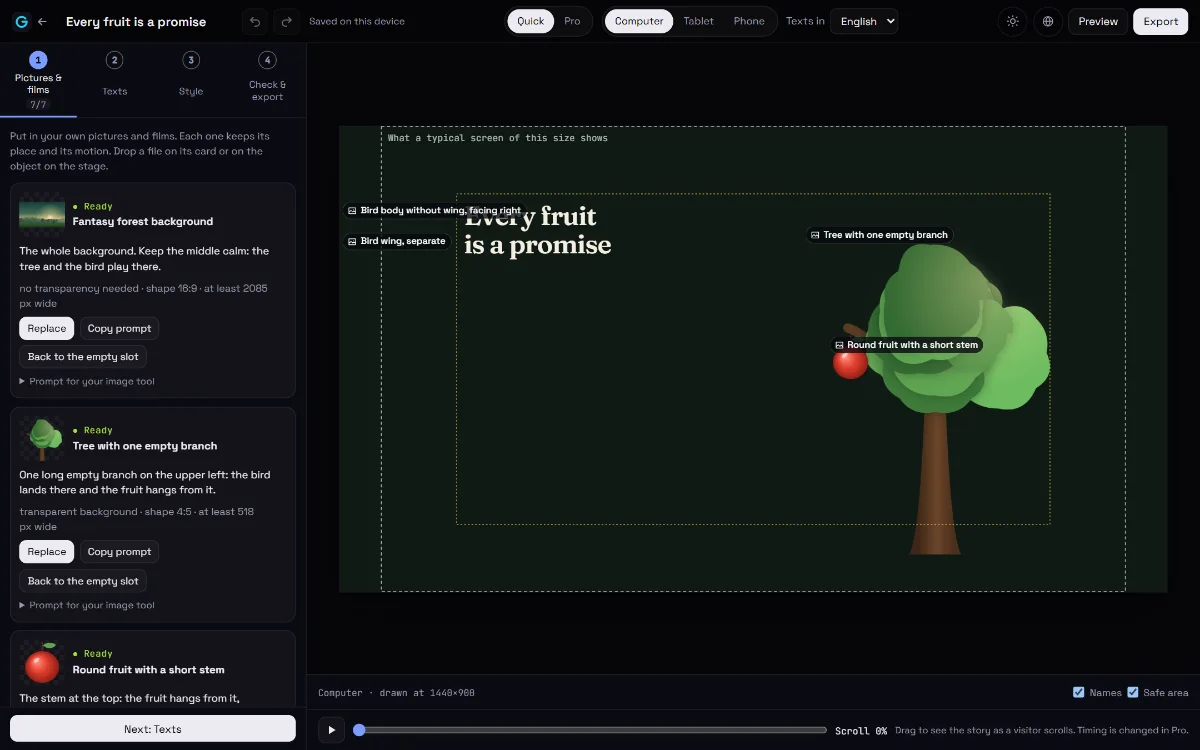
Every fruit is a promise

A bird flies to a tree and pecks a fruit loose; a new tree grows where it lands.

Open the live demo
04 · Landing page

Aurora Studio

A complete landing page with motion in every section.

Open the live demo

Drag or swipe

02 — How it works

From photos to a moving website in four steps

Quick mode walks you through it. Pro mode is there when you want to direct every motion.

  1. 01

    Pick a template

    Each template is a scroll story that already works on computer, tablet and phone.

  2. 02

    Swap in your pictures and words

    Drop a photo on a card: it is fitted to the right shape, so the motion stays exactly as designed.

  3. 03

    Check it on every screen

    Preview the real website on a computer, an upright tablet and a phone, and with motion turned off.

  4. 04

    Export and put it online

    Download the finished website as files and upload them to your hosting. One-click publishing is on the way.

03 — The Studio

Simple when you start, deep when you need it

You edit in your browser on a computer. The websites you make work on every screen.

  • Quick mode: four guided steps, nothing to learn first
  • Pro mode: 12 ready-made motions and 19 building blocks, paths you draw with a pen, a timeline you drag
  • Smart Replace: a new photo keeps the place and the motion of the old one
  • Videos that play as the visitor scrolls, frame by frame, forwards and back
  • Its own layout for computer, tablet and phone
  • Texts in up to 10 languages, and a still version for visitors who turn motion off
genesirion.com/studio Real screenshot
Pro mode in the Studio

04 — Ways to start

Make it yourself, or have us make it

01

Make it yourself, free

Open the Studio, pick a template and change it. Your work is saved on your computer and exports as a website.

Open the Studio
02

Start from a template

Browse the template library by style and industry. Every template is made and checked by Genesirion.

See the templates
03

Have us make it

Send us your photos and words. We build your launch website with the same Studio and hand it over ready to go online.

Ask for a quote

05 — Made for you

Launching soon? Send us your photos.

Tell us what you are launching and leave your email. We reply with a proposal and a price for your project. Service prices are separate from Studio plans.

We use your email only to reply to this request.

06 — Next on Genesirion

Built step by step, shown only when it works

Our goal is one place to build anything. Each part opens here when you can really use it.

  • Paid plans and one-click publishing
  • Contact forms, bookings and orders on your website
  • Web apps
Tell me when these open

07 — Start

Make your first moving website today

The Studio is free to try. Leave your email to hear when paid plans, publishing and the next tools open.

Open the Studio